Configuring Automatic Service Recovery for the VHS
This section describes the method CygNet Software recommends for Automatic Service Recovery for the VHS for installations with and without Quick Recovery enabled.
Automatic Service Recovery for VHS with Quick Recovery
If using the VHS Quick Recovery feature to recover a VHS after an abnormal shutdown, the service must be restarted before the Quick Recovery process will begin. This can be done manually, or it can be done automatically using automatic service recovery. The advantage of restarting the service automatically, is that it can reduce the amount time the VHS is down if the failure occurs at a time when it is inconvenient to restart it manually.
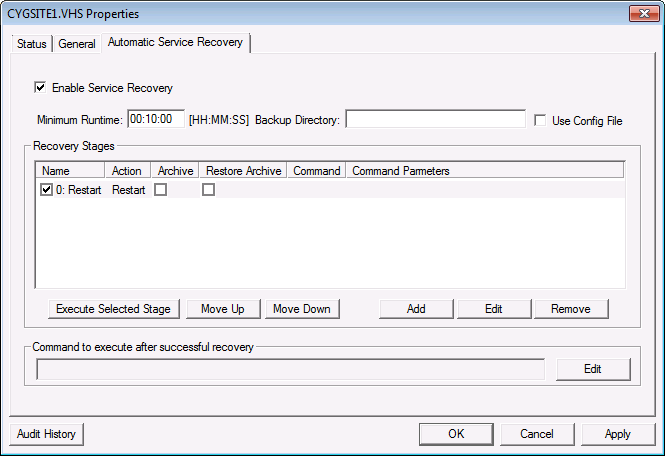
See Configuring a Recovery Stage for more information about how to configure automatic service recovery. For a VHS with the Quick Recovery feature enabled, CygNet recommends configuring a single automatic recovery stage using the Restart action. Do not enable the Archive or Restore archive on failure options if you have VHS Quick Recovery enabled, as it will disrupt the Quick Recovery feature.
|
Recommended Automatic Service Recovery Setup for VHS Quick Recovery |
Automatic Service Recovery for VHS without Quick Recovery
If VHS Quick Recovery is not enabled, CygNet recommends configuring a single automatic recovery stage using the Restart action as described above.
Enable VHS Check to run automatically to perform a data integrity check and repair any detected errors. It is necessary to check the VHS data files so the service will start. See VHS Check Utility for more information.
Optionally, you could configure the Archive option to archive the "dirty" VHS data files before the VHS Check runs. Then you could run the VHS Recovery utility at a later time to restore history data from backed up history data files. Note that you should make sure you have enough hard disk space to make a copy of the potentially large VHS data files. See VHS Recovery Utility for more information.

